This guide explains how to program TPMS sensors using four proven methods: Auto‑Create, Manual Input, Clone, and OBD Copy. Each method offers unique advantages, ensuring compatibility with most vehicles and simplifying the replacement process.
Please get a reliable TPMS sensor programming tool, such as Autel, Ateq, or Arvov, then follow these steps to learn how to program TPMS sensors effectively.
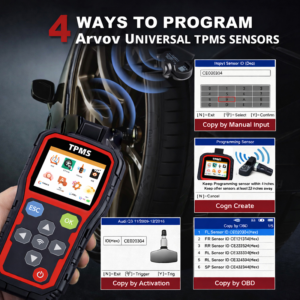
First: Auto‑Create (Universal Solution)
Generate a new, unique sensor ID that matches your vehicle’s protocol. This is ideal for replacing lost or damaged OEM sensors when the original ID is unavailable. It works seamlessly with most universal TPMS sensors and requires minimal technical knowledge.
Second: Manual Input (Precision Control)
Directly enter the 7‑8 digit sensor ID (found on the sensor or packaging) into the TPMS tool. This method ensures 100% accuracy and is recommended when you have the exact sensor specifications. It is widely used for OEM sensors and professional installations.
Third: Clone (Quick Replacement)
Copy the ID from the old, broken sensor to the new replacement. This avoids the need for dealer programming and maintains the vehicle’s original configuration. It is especially useful when you want a fast, hassle‑free swap without changing any system settings.
Fourth: OBD Copy (Efficiency)
Read the sensor IDs directly from the vehicle’s ECU via the OBD port and write them to the new sensors in one step. This is the fastest way to synchronize all four tires, reducing labor time and ensuring consistent performance across the entire TPMS system.