Step 1: Take off the tire:
Please park the car on safety area and use a car jack to lift the vehicle and secure it with jack stands. Then, remove the lug nuts completely and take off all the tire from the wheel.
Step 2: Delfate the tire:
Please deflate all the tires and let tire pressure of each tire to zero. Then use a tool to remove the old TPMS sensor.
Step 3: Install the New Sensor:
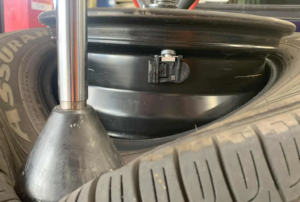 Put the new tire pressure sensor in the correct place and tighten the retaining nut to the manufacturer’s torque. After that please re-seat the tire bead and inflate all the tire to the correct pressure.
Step 4: Put the Wheel Back and Reset:
Reinstall the wheel, lower the car, and torque the lug nuts. Turn the ignition on and check if the TPMS light goes off.
Step 5: Relearn/Reset the TPMS System
This is the most important step. The car’s computer needs to recognize the new sensor’s unique ID.
Drive the Vehicle:
For many modern vehicles, simply driving the car at a speed above 20-30 mph (30-48 km/h) for 10-15 minutes will automatically trigger the “relearn” process as the sensors transmit their signals.
Manual Relearn (If Required):
Some vehicles require a specific procedure (e.g., activating the TPMS tool, or using the vehicle’s infotainment system).
Check the Dashboard:
The TPMS warning light should turn off once the system recognizes the new sensor. If it remains on, consult your owner’s manual for the specific reset procedure for your car model.
The above is a guide on how to replace a tpms sensor. I hope it will be helpful to you.
Troubleshooting Tips:
Light Still On? If the light doesn’t go out after driving, the sensor may not be properly installed, the battery may be dead (if it’s a used sensor), or the system may need a manual reset using a TPMS scan tool (available at auto parts stores).
Professional Help: If you are uncomfortable breaking the tire bead or using a torque wrench, it is recommended to have this service performed by a professional tire shop.